DDS Automation for EU Importers: Filing, Best Practices and Compliance Workflows
Published
, 9 minute read
Share this article
Quick summary: Learn how DDS automation helps EU importers connect supplier data, validate geolocation, document risk assessments and manage EUDR submissions through the EU Information System.
DDS automation for EU importers connects the various activities of preparing a DDS into a repeatable workflow. It can help teams collect and validate data, identify gaps, assemble the information needed for a statement, submit through the EU Information System where supported, and retain the resulting reference details. Automation supports the due diligence process; it does not replace the importer’s responsibility to assess the evidence and make the required decisions.
For EU importers, preparing a Due Diligence Statement (DDS) under the EU Deforestation Regulation (EUDR) is not simply a form-filling exercise. It depends on having accurate product details, production locations, supplier records and documented due diligence decisions available before the relevant products are placed on the EU market or exported. When these records sit across spreadsheets, emails, supplier portals and ERP systems, preparing a DDS can become slow and error-prone.
Key Takeaways
A DDS must be supported by the applicable due diligence process: information gathering, risk assessment and risk mitigation.
Product classification, quantity, country of production, supplier details and plot-level geolocation must be accurate and connected to the relevant products.
Automated validation can flag missing fields, inconsistent quantities, invalid geospatial files and incomplete supplier records before submission.
TRACES is the EU Information System used for DDS submission; automation options depend on supported integrations and user permissions.
Keep the DDS reference and verification details linked to the relevant records, and maintain the supporting evidence and audit trail.
A software workflow can reduce manual work, but it cannot guarantee compliance or replace human review.
Are your supplier records, plot geolocation, and due diligence evidence ready for scrutiny? Identify potential gaps before they become compliance challenges.
Download our eBook to assess your EUDR readiness, uncover data gaps, and take proactive steps towards stronger compliance.
A Due Diligence Statement is the electronic statement submitted by an operator or authorised representative through the EU Deforestation Regulation Information System before placing relevant products on the Union market or exporting them. The statement is connected to a due diligence process involving information gathering, risk assessment and, where needed, risk mitigation. Following submission, the Information System assigns a reference number and a verification number.
The statement is not a substitute for the work behind it. Importers need to establish that relevant products are within scope, gather the information required by the Regulation, evaluate the risk of non-compliance and take appropriate mitigation measures where risks are identified. Certifications or supplier assurances may contribute evidence, but should not automatically be treated as a replacement for the required assessment.
Farm, cooperative, processor and exporter information may arrive in different formats. Missing identifiers make it difficult to connect a shipment to the relevant production locations.
Product and customs data do not match
HS/CN classification, product descriptions, quantities and country-of-production details may differ between procurement systems, invoices and customs records. These inconsistencies should be resolved before submission.
Geolocation needs careful validation
Coordinates or polygons can be missing, malformed, duplicated or linked to the wrong supplier or product. For mixed-origin batches, the sourcing information needs to preserve the relevant plot relationships.
Risk assessment is hard to evidence
A conclusion should be traceable to the information reviewed, the risks considered and any mitigation undertaken not simply a tick box in a spreadsheet.
Manual TRACES entry does not scale easily
Re-entering information from internal systems increases workload and creates opportunities for transcription errors, especially when an importer handles many suppliers and product lines.
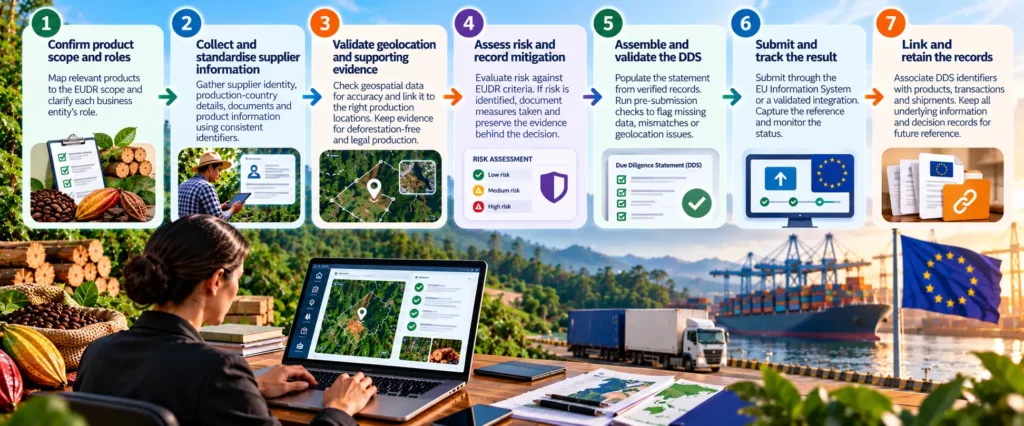
How DDS Automation for Importers Works: A Practical Workflow
1. Confirm product scope and roles
Map relevant products to the applicable EUDR product scope and clarify the role of each business entity in the transaction. Do not assume a product is in scope or out of scope based on a broad commodity name alone.
2. Collect and standardise supplier information
Use structured onboarding to collect supplier identity, production-country details, supporting documents and relevant product information. Apply consistent supplier, plot, batch and shipment identifiers so records can be linked.
3. Validate geolocation and supporting evidence
Check that submitted geospatial data uses an accepted format, contains valid geometry and is associated with the right production locations. Maintain supporting evidence for deforestation-free and legal-production assessments.
4. Assess risk and record mitigation
Document the assessment against the applicable EUDR criteria. If risk is identified, record the additional information or measures considered and the basis for the final conclusion. The system should preserve the evidence behind the decision.
5. Assemble and validate the DDS
Populate the statement from verified source records rather than retyping data. Pre-submission checks can flag missing fields, mismatched quantities, invalid codes or unresolved geolocation issues for review.
6. Submit and track the result
Submit through the EU Information System, either through its supported interface or a validated integration where available and authorised. Capture the returned reference and verification details, and monitor the submission status.
7. Link and retain the records
Associate the DDS identifiers with the relevant products, transactions and shipment records. Retain the underlying information and decision trail so teams can retrieve it when needed.
The most effective DDS workflows start before shipment preparation. Build data collection into supplier onboarding and procurement instead of waiting until a container is ready to leave. Standardise supplier questionnaires, define mandatory fields, assign owners to resolve data gaps and establish clear review checkpoints.
Treat certifications as supporting evidence, not an automatic substitute for due diligence.
Use consistent identifiers to connect supplier, plot, product, batch, purchase order and shipment records.
Validate geospatial files and product quantities before generating the statement.
Keep a record of risk assessment findings, mitigation steps, approvals and data corrections.
Plan for exceptions: rejected or incomplete data should return to a named owner with a clear resolution status.
Test the full workflow on representative transactions before scaling it across all relevant suppliers and products.
Record retention and amendment procedures should follow the current Regulation and Information System guidance. Avoid hard-coding legal assumptions into software workflows without a process to review regulatory and system updates.
Missed Our Webinar on EUDR Beyond DDS? Catch the Recording!
Watch the webinar recording to understand what lies beyond DDS filing and how to strengthen your EUDR compliance workflow.
When evaluating a platform, EU importers should ask vendors to demonstrate the actual workflow using representative supplier and shipment data not only a feature checklist. Key evaluation points include:
Supplier onboarding and structured data collection across multiple tiers.
Geolocation upload, format validation and links between plots and relevant products.
Product and shipment traceability, including quantity reconciliation and record retrieval.
Documented risk assessment, mitigation tracking and a clear audit trail.
Integration with ERP, procurement or traceability systems to reduce duplicate entry.
Supported EU Information System submission options, status handling and reference-number capture.
Role-based access, exception handling, data export and support for regulatory updates.
TraceX’s EUDR solution is positioned around connecting supplier and plot information, traceability records, risk assessment and DDS workflows. For EU importers, the practical evaluation should focus on how the platform handles the organisation’s specific data sources, validates supplier and geolocation information, connects records to products and shipments, and supports the relevant submission process.
A useful product demonstration should walk through one representative shipment from supplier onboarding to plot data validation, risk review, DDS preparation, submission status and reference capture. Ask how exceptions are resolved, what integrations are supported in your environment, and which steps require user approval. Software should make the process more organised and repeatable not imply that a generated statement alone guarantees compliance.
For EU importers, DDS automation is most valuable when it connects the work that happens before submission: supplier onboarding, product classification, geolocation validation, evidence collection, risk assessment and shipment traceability. A structured workflow helps teams identify gaps earlier, reduce repetitive entry and retrieve the records behind a declaration. Choose a platform that fits your real systems and processes, and keep human review and regulatory accountability at the centre.
Frequently Asked Questions
Can DDS automation guarantee EUDR compliance?
No. Automation can help organise data, validate fields, flag gaps and support submission. The operator remains responsible for the required due diligence, risk decisions and accuracy of the statement.
Does the EU TRACES system itself perform all due diligence for an importer?
No. The Information System is used to submit and manage statements. The importer must gather the relevant information and complete the applicable risk assessment and mitigation before submitting.
Can an importer reuse supplier or plot data for multiple shipments?
An importer can reuse records when they remain accurate and applicable, but each statement must reflect the relevant products and sourcing information. Build checks to confirm that the data still applies to the transaction.
What should happen if a DDS is rejected or source data is incomplete?
If a DDS is rejected, route the issue to a responsible owner, correct or verify the underlying information, document the resolution and follow the current Information System process for resubmission or amendment.
What is the difference between a DDS reference number and verification number?
The difference is that EU Information System assigns both to a submitted DDS. They serve distinct purposes, so store them in separate fields and follow current guidance on how each should be used.
Start using TraceX
Transparency, Trust, & Success for your Climate Journey.
We use cookies on our website to give you the most relevant experience by remembering your preferences and repeat visits. By clicking “Accept All”, you consent to the use of ALL the cookies. However, you may visit "Cookie Settings" to provide a controlled consent.
This website uses cookies to improve your experience while you navigate through the website. Out of these, the cookies that are categorized as necessary are stored on your browser as they are essential for the working of basic functionalities of the website. We also use third-party cookies that help us analyze and understand how you use this website. These cookies will be stored in your browser only with your consent. You also have the option to opt-out of these cookies. But opting out of some of these cookies may affect your browsing experience.
Necessary cookies are absolutely essential for the website to function properly. These cookies ensure basic functionalities and security features of the website, anonymously.
Cookie
Duration
Description
cookielawinfo-checkbox-analytics
11 months
This cookie is set by GDPR Cookie Consent plugin. The cookie is used to store the user consent for the cookies in the category "Analytics".
cookielawinfo-checkbox-functional
11 months
The cookie is set by GDPR cookie consent to record the user consent for the cookies in the category "Functional".
cookielawinfo-checkbox-necessary
11 months
This cookie is set by GDPR Cookie Consent plugin. The cookies is used to store the user consent for the cookies in the category "Necessary".
cookielawinfo-checkbox-others
11 months
This cookie is set by GDPR Cookie Consent plugin. The cookie is used to store the user consent for the cookies in the category "Other.
cookielawinfo-checkbox-performance
11 months
This cookie is set by GDPR Cookie Consent plugin. The cookie is used to store the user consent for the cookies in the category "Performance".
viewed_cookie_policy
11 months
The cookie is set by the GDPR Cookie Consent plugin and is used to store whether or not user has consented to the use of cookies. It does not store any personal data.
Functional cookies help to perform certain functionalities like sharing the content of the website on social media platforms, collect feedbacks, and other third-party features.
Performance cookies are used to understand and analyze the key performance indexes of the website which helps in delivering a better user experience for the visitors.
Analytical cookies are used to understand how visitors interact with the website. These cookies help provide information on metrics the number of visitors, bounce rate, traffic source, etc.
Advertisement cookies are used to provide visitors with relevant ads and marketing campaigns. These cookies track visitors across websites and collect information to provide customized ads.
Download the 2026 Traceability Scorecard and Benchmark Your Supply Chain Across 10 Critical Capabilities.
Download our eBook
Don’t Wait for an Audit to Find Your EUDR Gaps
The 2026 Simplification Package changes how HS codes, DDS pass-through and geolocation rules apply to you. Get the free guide and 20-point readiness checklist before enforcement catches you unprepared.