EUDR Outbound Declarations: How to Connect ERP, Shipments and DDS
Published
, 8 minute read
Share this article
Quick summary: EUDR outbound declarations explained: link ERP orders, batches and shipments to the DDS and pass reference numbers to customs before December 2026.
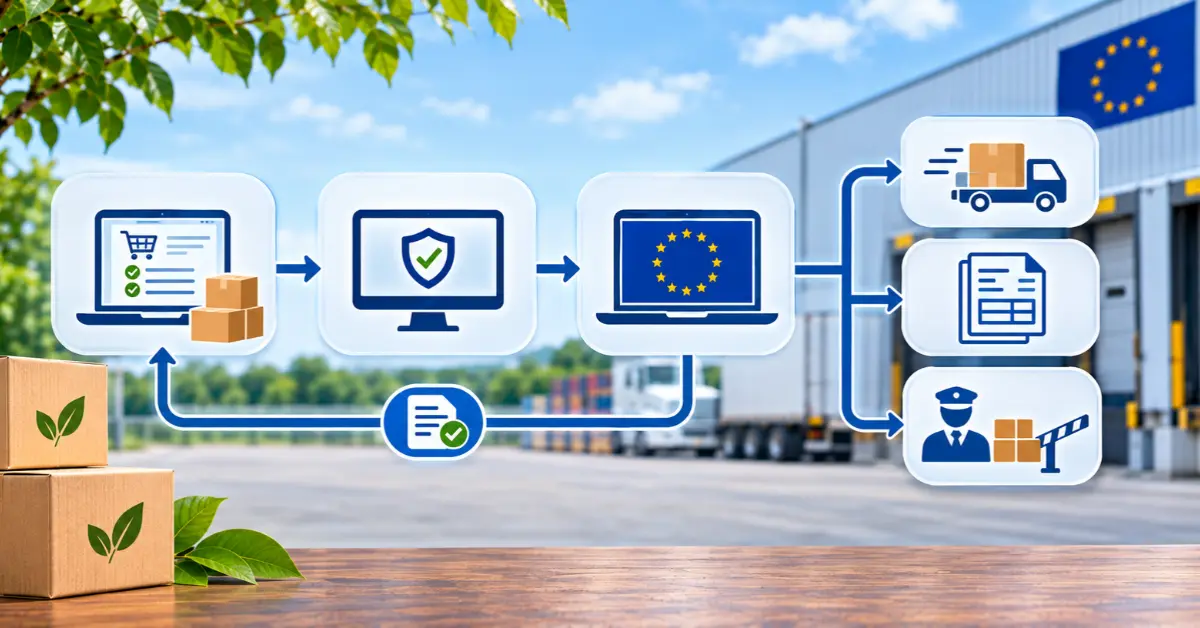
EUDR outbound declarations are the Due Diligence Statements (DDS) a company files for goods it places on the EU market or exports, together with the reference and verification numbers it passes on to customs and customers. Connecting them to your ERP means linking each sales order, batch and shipment to its supplier evidence, filing the DDS before customs clearance, and writing the returned reference number back onto delivery notes, invoices and the customs declaration under code C716.
Key takeaways
Under Regulation (EU) 2025/2650, only the operator that first places goods on the EU market or exports them files a DDS. Downstream companies record inbound references instead.
The DDS reference number is the link between EUDR and customs: no valid reference, no release.
One DDS can cover several customs declarations, and one declaration can cite several DDS.
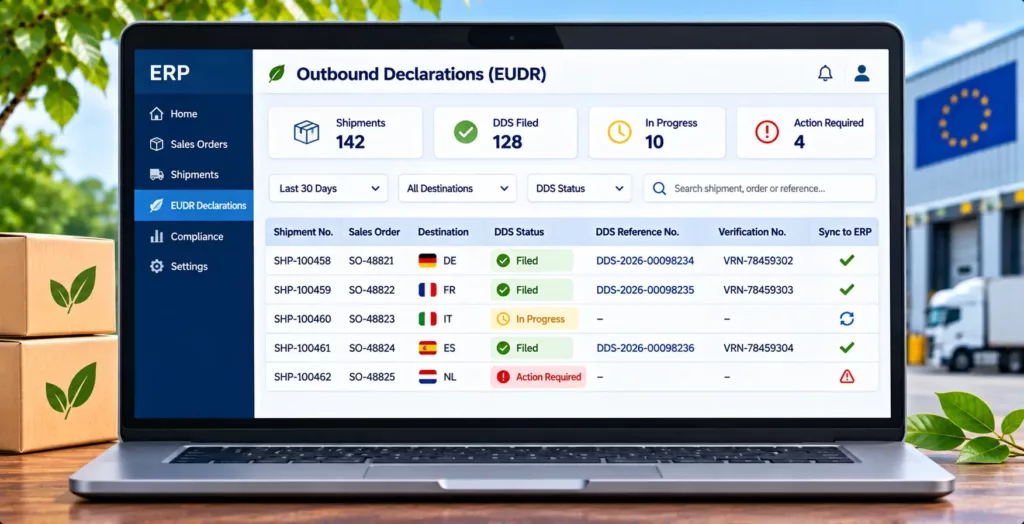
Store the reference and verification numbers as dedicated ERP fields, not comments, and keep them for five years.
Download our eBook
Assess your EUDR readiness, uncover data gaps, and take proactive steps towards stronger compliance.
EUDR outbound declarations are where EUDR compliance meets daily logistics. From 30 December 2026, large and medium operators cannot release relevant goods for free circulation, or export them, unless the customs declaration carries a valid DDS reference.
In plain language, an outbound declaration is the statement you file for goods leaving your hands, plus the reference number that travels with them to customs and to your customer.
Most ERPs already know the order, the batch and the container. What they lack is the link between that shipment, the plot-level evidence behind it and the reference number the EU Information System returns. This guide shows how to build that link so EUDR outbound declarations run on every shipment without re-keying.
Which of your SKUs need outbound declarations?
Run your product list through TraceX’s free EUDR Scope Check to see which HS codes fall under Annex I after the September 2026 scope change.
EUDR Outbound Declarations: What They Are and Who Files Them
The outbound side starts where your inbound evidence ends.
How inbound references differ from outbound declarations
Who files after the December 2025 amendment
Inbound References vs Outbound Declarations
Inbound references are the DDS numbers your suppliers pass to you. Outbound declarations are the statements you submit yourself, which return a reference number and a verification number that you pass downstream. A trading company may receive many inbound references and group them under one outbound DDS for a shipment.
Who Files Outbound Declarations After Regulation (EU) 2025/2650
The December 2025 amendment placed DDS filing exclusively on the operator that first places relevant products on the EU market or exports them, usually the EU importer or the EU producer. Downstream operators and traders no longer file their own statements; the first downstream company records and keeps the upstream reference. For most supply chains, EUDR outbound declarations now sit with one company per product flow, which makes that company’s ERP the place where the chain is proven.
EUDR Outbound Declarations and Customs: Where the Reference Number Goes
One number has to reach five places, and customs is the one that blocks the container.
Customs codes and documents that carry the reference
Destination
What it carries
Owner
Customs declaration
Code C716 plus the DDS reference number in the documents section; C717 plus the identifier for simplified declarations
Operator or customs broker
Delivery note and invoice
DDS reference and verification number per line or batch
ERP sales and billing
First downstream customer
Reference number, so they can record it against their goods receipt
Sales or customer portal
Freight forwarder
Reference per consignment before the vessel or truck arrives
Logistics
Audit archive
DDS, evidence and reference, kept for five years
Compliance
One DDS can cover several customs declarations, and one declaration can cite several DDS, so the grouping logic you choose in the ERP matters. Authorities may also hold back a reference number to check a statement, which is why EUDR outbound declarations should be filed days ahead of clearance, not on arrival.
EUDR Outbound Declarations in 5 Steps: From ERP Order to Filed DDS
A repeatable sequence turns each shipment into a filed statement.
Classify, link evidence, group, file, distribute
Outbound Declaration Step 1: Classify Items in the ERP Master Data
Flag every item whose HS code falls under Annex I, using the scope as amended by Delegated Regulation (EU) 2026/2102. A missing flag means a shipment never triggers EUDR outbound declarations, and the gap only shows up at the border.
Outbound Declaration Step 2: Link Evidence to Batches at Goods Receipt
Attach supplier details, plot geolocation, risk assessment results and any inbound references to the batch when goods arrive. EUDR outbound declarations are only as complete as the batch records behind them.
Outbound Declaration Step 3: Decide the DDS Grouping Rule
Choose whether one DDS covers a single shipment, a batch, or several shipments of the same product. Document the rule, because auditors will ask how each reference in your EUDR outbound declarations maps to physical goods in the warehouse and on the vessel.
Outbound Declaration Steps 4 and 5: File, Write Back and Distribute
Submit the DDS to the EU Information System, through its interface or an API connection, and write the reference and verification numbers back to the ERP as dedicated fields. From there, EUDR outbound declarations flow onto the delivery note, the invoice, the broker’s customs declaration and the customer record automatically.
DDS consolidation under EUDR can simplify compliance for businesses managing multiple suppliers, sourcing locations and upstream declarations. Discover how grouped Due Diligence Statements work, what the regulatory requirements involve and how consolidation can streamline supply-chain compliance.Read the Blog →
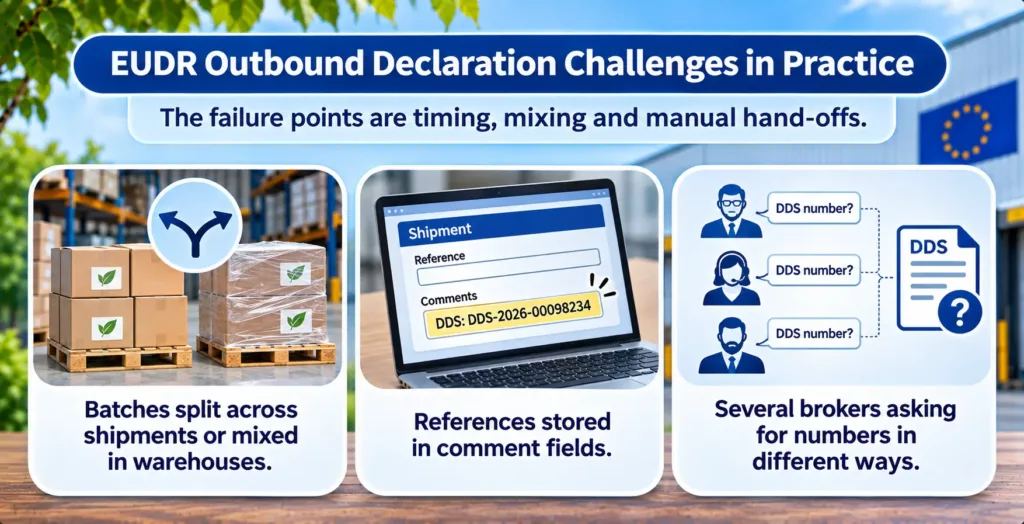
EUDR Outbound Declaration Challenges in Practice
A container is only as clearable as the reference number on its customs declaration.
When one batch splits across three containers, or two batches merge in a warehouse, the reference logic breaks unless the ERP tracks it. References typed into free-text fields get lost before they reach the broker. Fixing these gaps is what makes EUDR outbound declarations scale from a pilot shipment to thousands a year.
How TraceX connects ERP, shipments and DDS
TraceX’s EUDR compliance solution, sits between your ERP and the EU Information System so EUDR outbound declarations run without re-keying. It connects to SAP, Oracle and Microsoft Dynamics through pre-built connectors, links inbound supplier evidence and validated GeoJSON plots to each batch, submits DDS data to the EU Information System via API and writes reference and verification numbers back to the ERP.
The legal methodology was validated by Maruszkin Law Firm, the platform is ISO 27001, SOC 1 and SOC 2 compliant, and EUDR clients in 8 countries already use it. Typical onboarding takes four weeks.
Connect your ERP to EUDR before 30 December 2026
See how TraceX Cleara AI links your ERP orders and batches to supplier evidence, files DDS and returns reference numbers to every shipping document.
Score any vendor on these six questions before your next ERP release.
Does it integrate with your ERP through standard connectors or APIs, not flat-file uploads?
Can it link inbound references and plot evidence to batches at goods receipt?
Does it support configurable DDS grouping per shipment, batch or period?
Can it submit to the EU Information System by API and return reference and verification numbers automatically?
Does it push references to delivery notes, invoices and broker messages?
Is the legal methodology independently reviewed, and is data security certified?
Frequently Asked Questions
What is an EUDR outbound declaration?
It is the DDS you file for goods you place on the EU market or export, plus the reference and verification numbers you pass to customs and your first downstream customer.
Do downstream companies still file EUDR outbound declarations?
No. Since Regulation (EU) 2025/2650, downstream operators and traders do not file their own DDS. The first downstream company records and keeps the upstream reference number.
Which customs code carries the DDS reference?
Code C716, entered with the DDS reference number in the documents section of the customs declaration. Simplified declarations use C717 with their identifier.
Can one DDS cover several shipments?
Yes. One DDS can cover several customs declarations, and one declaration can cite several DDS, as long as the goods are covered.
When should EUDR outbound declarations be filed?
Before customs clearance, and ideally several days ahead, because authorities may delay a reference number while they check a statement.
Start using TraceX
Transparency, Trust, & Success for your Climate Journey.
We use cookies on our website to give you the most relevant experience by remembering your preferences and repeat visits. By clicking “Accept All”, you consent to the use of ALL the cookies. However, you may visit "Cookie Settings" to provide a controlled consent.
This website uses cookies to improve your experience while you navigate through the website. Out of these, the cookies that are categorized as necessary are stored on your browser as they are essential for the working of basic functionalities of the website. We also use third-party cookies that help us analyze and understand how you use this website. These cookies will be stored in your browser only with your consent. You also have the option to opt-out of these cookies. But opting out of some of these cookies may affect your browsing experience.
Necessary cookies are absolutely essential for the website to function properly. These cookies ensure basic functionalities and security features of the website, anonymously.
Cookie
Duration
Description
cookielawinfo-checkbox-analytics
11 months
This cookie is set by GDPR Cookie Consent plugin. The cookie is used to store the user consent for the cookies in the category "Analytics".
cookielawinfo-checkbox-functional
11 months
The cookie is set by GDPR cookie consent to record the user consent for the cookies in the category "Functional".
cookielawinfo-checkbox-necessary
11 months
This cookie is set by GDPR Cookie Consent plugin. The cookies is used to store the user consent for the cookies in the category "Necessary".
cookielawinfo-checkbox-others
11 months
This cookie is set by GDPR Cookie Consent plugin. The cookie is used to store the user consent for the cookies in the category "Other.
cookielawinfo-checkbox-performance
11 months
This cookie is set by GDPR Cookie Consent plugin. The cookie is used to store the user consent for the cookies in the category "Performance".
viewed_cookie_policy
11 months
The cookie is set by the GDPR Cookie Consent plugin and is used to store whether or not user has consented to the use of cookies. It does not store any personal data.
Functional cookies help to perform certain functionalities like sharing the content of the website on social media platforms, collect feedbacks, and other third-party features.
Performance cookies are used to understand and analyze the key performance indexes of the website which helps in delivering a better user experience for the visitors.
Analytical cookies are used to understand how visitors interact with the website. These cookies help provide information on metrics the number of visitors, bounce rate, traffic source, etc.
Advertisement cookies are used to provide visitors with relevant ads and marketing campaigns. These cookies track visitors across websites and collect information to provide customized ads.