EUDR APIs: The Missing Link Between Your ERP and EU TRACES
Published
, 12 minute read
Share this article
Quick summary: Discover how EUDR API solutions are revolutionizing compliance by enabling seamless integration with ERP systems and satellite monitoring. Learn how APIs help streamline reporting and enhance transparency for deforestation-free supply chains
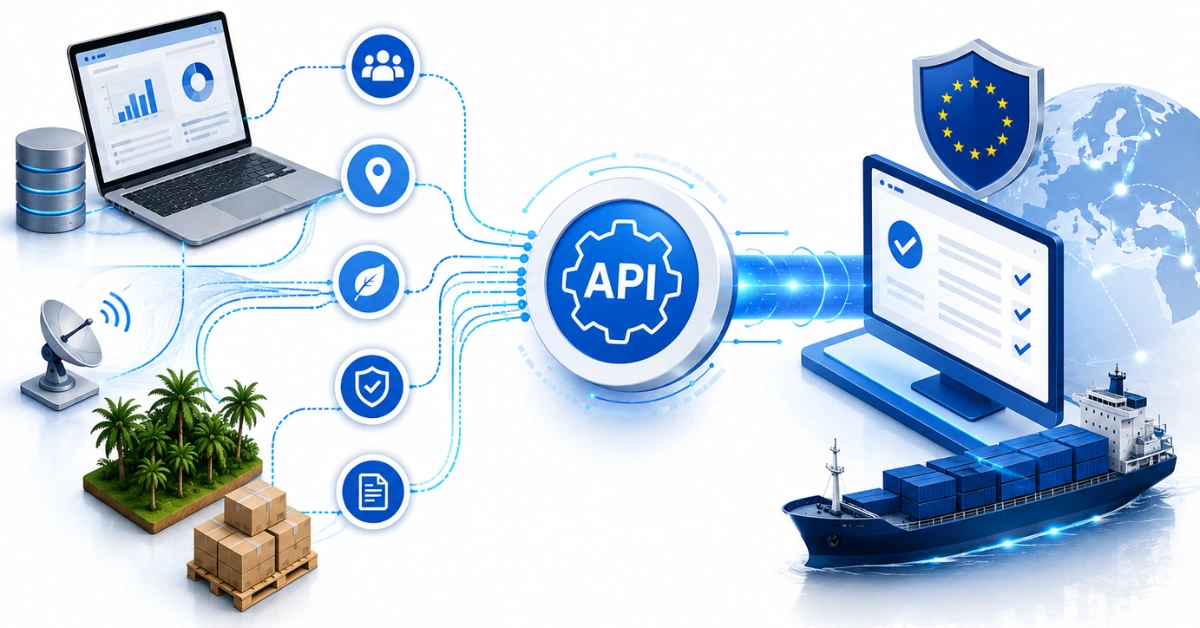
EUDR APIs are software interfaces that collect, validate, and structure supplier, geolocation, and risk data into Due Diligence Statements (DDS) submitted to the EU TRACES system under the EU Deforestation Regulation. Standard ERP systems store transactions and supplier addresses not GPS polygons, deforestation risk scores, or TRACES-ready DDS formats. This API layer closes that gap by enriching ERP data with supplier KYC, plot-level geolocation, and satellite-based risk screening, then converting it into validated JSON/XML submissions filed directly to TRACES. Importers, traders, and roasters managing multi-origin supply chains benefit most: compliance happens before goods ship, not at the border. TraceX provides an API-first, ERP-agnostic platform that automates this entire pipeline from field data capture to one-click DDS filing.
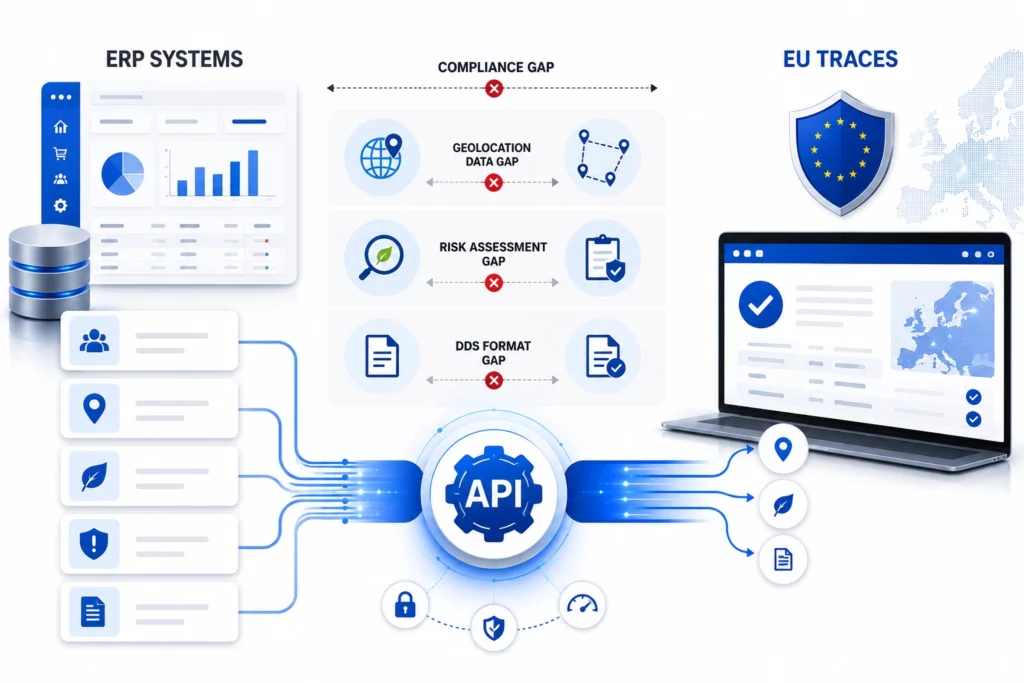
EUDR APIs exist because of a structural mismatch: the data you already hold in your ERP cannot be submitted to the EU TRACES system in the form the EU Deforestation Regulation requires. Your ERP knows what you bought, from whom, and when it shipped. TRACES demands to know where down to the GPS polygon of the farm plot whether that land was deforested after the December 31, 2020 cut-off, and whether every supplier in the chain passes legality checks.
The result, for most compliance teams, is a familiar grind: exporting spreadsheets, chasing supplier documents by email, and manually re-keying data into TRACES right when shipments are on the line. Missing fields, inconsistent formats, and unvalidated geolocation lead to delayed DDS submissions, blocked customs clearance, and mounting operational risk.
This guide restructures the problem from the ground up: what these interfaces actually are, why your ERP can’t do this alone, what data flows through the pipeline, how the integration stack works layer by layer, and how to evaluate vendors before you commit. If your goal is DDS filings that clear before coffee, cocoa, timber, or rubber is on the water not at the border this is the architecture that gets you there.
Key Takeaways
EUDR APIs act as the technical bridge between internal systems (ERP, supplier portals, spreadsheets) and EUDR-compliant market access via TRACES.
ERPs alone cannot meet EUDR requirements farm-level geolocation, deforestation risk checks, and DDS formatting all fall outside standard ERP capabilities.
Manual TRACES submission is the single biggest source of DDS rejections: missing fields, inconsistent formats, and unvalidated polygons.
A four-layer integration stack field capture, ERP sync, risk assessment, TRACES filing moves data from plot to portal without manual re-entry.
TraceX offers pre-built ERP connectors, AI-driven validation, and direct TRACES filing, reducing DDS prep time
Every Day You Delay EUDR Preparation Increases Compliance Risk
Get expert guidance with a complimentary EUDR Readiness Consultation
A purpose-built software interface that turns raw supply chain data into TRACES-ready Due Diligence Statements. This section covers:
The formal definition and what makes it different from a generic ERP integration
The four data types it is built to handle
Why ‘API-first’ matters more than ‘has an API’
An EUDR API is a software interface that enables companies to collect, validate, and structure supplier, geolocation, and risk data into Due Diligence Statements (DDS) that can be submitted to TRACES under the EU Deforestation Regulation. In simple terms, it is the technical bridge between your internal systems ERP, supplier portals, spreadsheets and EUDR-compliant market access.
Looking for a complete roadmap to EUDR compliance?
What separates it from a generic middleware connector is specialization. A standard integration moves invoices and purchase orders between systems that already speak similar languages. EUDR compliance requires data types that ordinary business systems were never designed to hold, validate, or transmit:
Supplier KYC data — legal entity details, supplier roles (farmer, cooperative, exporter), country of origin, and traceability identifiers.
Farm and plot geolocation data — GPS coordinates and polygon boundaries for farms and plots, linked directly to supplied volumes and products.
Deforestation risk data — land-use change analysis against satellite reference datasets (JRC, Hansen, Sentinel-2), benchmarked by origin-country risk classification.
DDS payloads — structured JSON/XML submissions with validated EORI numbers, HS codes, commodity descriptions, and geolocation attachments, formatted to TRACES specifications.
‘API-first’ means the platform was architected so every one of these functions is programmatically accessible not a manual portal with an export button bolted on. That distinction decides whether compliance scales with your shipment volume or collapses under it.
ERPs run your business, but EUDR demands data your ERP was never designed to handle and that gap is where most compliance failures begin. This section covers:
The three EUDR requirements that fall outside standard ERP capabilities
What happens operationally when the gap is bridged manually
Farm-Level Geolocation Your ERP Cannot Store
Traditional ERP systems were designed to manage transactions, inventory, and finance not environmental compliance at farm level. ERPs typically store supplier addresses, not GPS polygons for individual farms or plots. EUDR requires precise geospatial data polygon boundaries for plots above 4 hectares that most ERPs cannot capture, validate, or visualize.
Deforestation Risk Checks No ERP Module Performs
ERPs do not assess land-use change, deforestation cut-off dates, or geographic risk. EUDR requires every origin plot to be screened against satellite forest-cover datasets and classified against the EU’s country benchmarking system (low, standard, or high risk). A high-risk designation can mean 9% of shipments are audited annually a screening burden no ERP module was built to carry.
DDS Formatting and Direct TRACES Submission
Even when the data exists somewhere in your stack, TRACES will not accept it as-is. DDS submissions require specific field structures, validated identifiers, and correctly formatted geolocation files (GeoJSON). Compliance teams bridging this manually re-enter data shipment by shipment and every manual step is a rejection risk. What starts as a workaround quickly becomes a systemic compliance bottleneck.
How EUDR APIs Work: The Four-Layer Integration Stack
A fully integrated compliance stack moves data from field to TRACES without manual intervention, through four connected layers. This section covers:
What each layer does and which systems it touches
Where validation happens and why ‘validate before submit’ is the whole game
Layer 1 — Field Data Capture
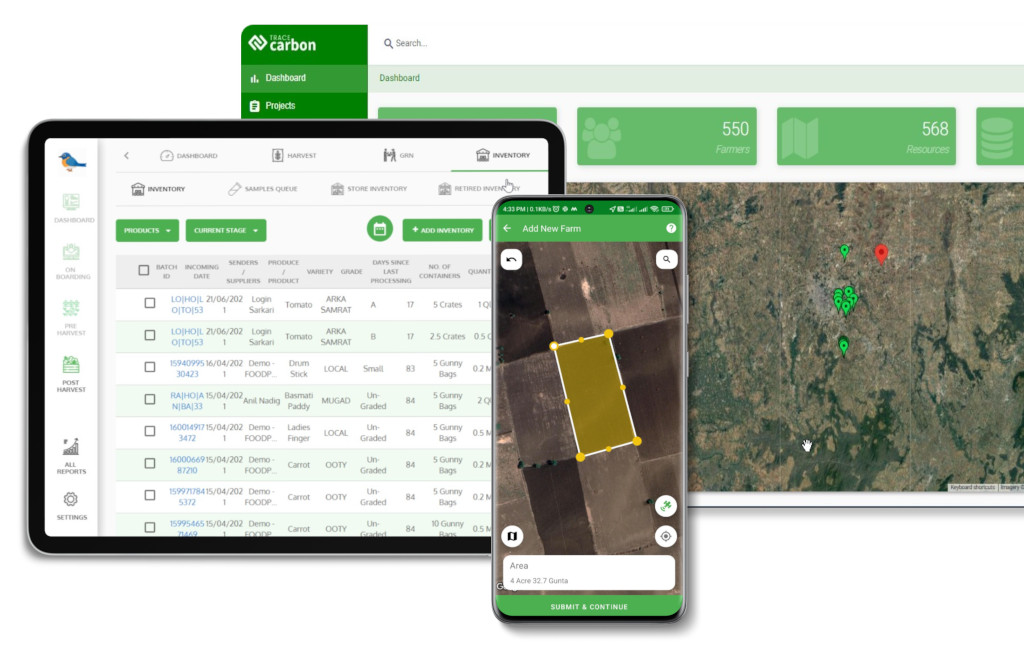
GPS polygon mapping, crop data, and ownership documents are collected via mobile apps that work offline essential in smallholder regions where connectivity is unreliable by definition. AI geometry checks validate and correct polygon boundaries at the point of capture, so bad coordinates never enter the pipeline.
Layer 2 — ERP Sync
Supplier profiles, shipment data, and procurement records are pulled via pre-built ERP connectors (SAP, Oracle, Microsoft Dynamics, NetSuite ). No ground-up rebuild: the API layer maps your existing master data to EUDR data models, so procurement keeps working in the ERP while compliance data flows automatically.
Layer 3 — Risk Assessment
Every geolocated plot is cross-referenced against JRC and Hansen forest-cover datasets, with Sentinel-2 imagery enabling near-real-time deforestation alerts rather than annual snapshots. Automated risk scoring flags legality discrepancies, missing documentation, and land-use change against the December 31, 2020 cut-off before a shipment is ever booked.
Layer 4 — TRACES Filing
A DDS is auto-generated in JSON/XML with EORI and HS code validation, geolocation attachments in compliant GeoJSON, and all mandatory fields pre-populated. Submission goes directly to EU TRACES via API one click, with a timestamped, audit-ready record retained for the mandatory 5-year period.
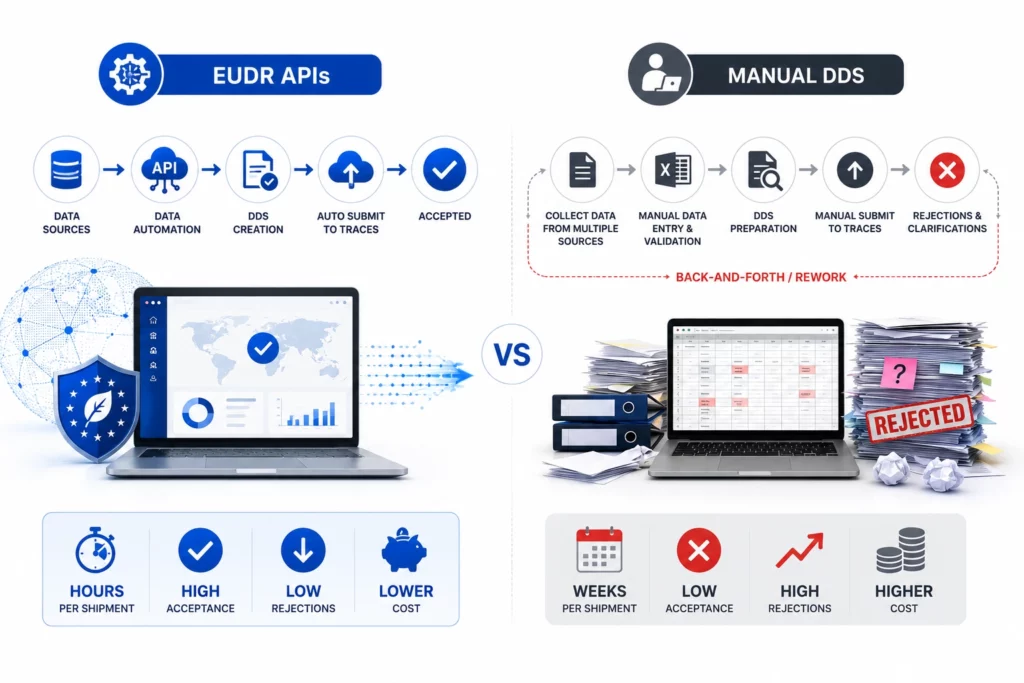
EUDR APIs vs Manual TRACES Submission
The difference is not convenience it is rejection rates, clearance speed, and audit readiness. The table below compares the two operating models side by side.
Compliance step
Manual process
API-driven process
Supplier onboarding
Email chains, PDFs, phone photos; weeks per supplier
Digital invites, AI document parsing; KYC captured in [hours]
Geolocation data
Spreadsheet coordinates, unvalidated; polygon errors found at submission
GeoJSON validated against EUDR geometry standards before filing
Risk screening
One-time desk check at onboarding, static snapshots
Continuous satellite monitoring (JRC, Hansen, Sentinel-2) with live alerts
DDS preparation
Copy-paste into TRACES per shipment; high field-error rate
Who Benefits Most from API-Driven EUDR Compliance?
Any operator or trader filing DDS at volume gains but three profiles see the fastest payback. This section covers:
EU importers and first placers on the market
Traders and downstream operators managing DDS references
Roasters, manufacturers, and multi-origin sourcing teams
EU importers (operators). As the first placer on the EU market, you carry the DDS filing obligation. Multi-origin sourcing means hundreds of plots, dozens of suppliers, and a filing per product line exactly the volume profile where manual submission breaks first.
Traders and downstream operators. You must collect, validate, and store upstream DDS reference numbers and confirm they cover the correct commodity, origin, and cut-off date. An API layer automates reference collection and flags expiring or mismatched documentation before it becomes your audit problem.
Roasters and manufacturers. Whether you import directly or buy through EU importers, your buyers increasingly write DDS verification into procurement contracts. Integration determines whether you can evidence compliance at contract speed.
EUDR compliance is a shared responsibility across the supply chain.
Most rejections trace back to three treatable errors in how companies approach integration. This section covers:
Treating EUDR as a one-time upload rather than a living data pipeline
Relying on PDFs and unstructured documents
Ignoring data changes after submission
Mistake 1 — the one-time upload. EUDR is not a filing event; it is dynamic compliance. Supplier classifications change, plots are added, country benchmarks are revised. A pipeline that syncs continuously stays compliant; a quarterly export does not.
Mistake 2 — PDF-based evidence. TRACES consumes structured data. Evidence trapped in PDFs must be re-keyed reintroducing exactly the manual error rate the integration was meant to eliminate. Document parsing belongs at intake, converting unstructured supplier files into validated fields once.
Mistake 3 — ignoring post-submission changes. A DDS references real-world conditions that keep moving: certifications expire, land records lapse, satellite alerts fire. Without automated monitoring and re-validation, yesterday’s compliant submission becomes today’s audit finding.
EUDR API Buyer Checklist: 7 Questions Before You Sign
Not every platform claiming EUDR readiness can survive an audit pressure-test vendors with these questions.
Does the platform support polygon mapping, not just point coordinates? Points don’t satisfy EUDR geolocation requirements for larger plots.
Is TRACES submission a direct API integration or a manual upload dressed up as automation?
Which satellite datasets power deforestation screening? Look for JRC, Hansen/GLAD, and Sentinel-2 as the industry standard.
Can field data be captured offline, in local languages, for smallholder onboarding?
Are ERP connectors pre-built (SAP, Oracle, Dynamics, NetSuite ) or custom development projects?
How are records retained is the 5-year audit trail immutable and exportable on demand (PDF, XML, CSV)?
How does the platform handle multi-country supply chains and differing origin-risk benchmarks?
How TraceX Automates the ERP-to-TRACES Pipeline
TraceX EUDR Solutions operationalizes all four layers in a single API-first, ERP-agnostic platform. This section covers:
The core capabilities mapped to each pain point
What ‘one-click compliance’ means in practice
TraceX was built for exactly the failure points described above not another compliance checklist, but a single, TRACES-ready pipeline:
ERP connectors: pre-built integrations with SAP, Oracle, Microsoft Dynamics, and other major platforms no ground-up rebuild required.
AI-powered intake: document parsers and invoice extractors capture supplier KYC, land tenure, and certification data without manual entry.
Geometry validation: plot boundaries validated and auto-corrected against EUDR geometry standards before any DDS is generated.
Continuous risk engine: JRC and Hansen datasets plus Sentinel-2 alerts score every supplier in real time, flagging issues before shipment.
Direct TRACES filing: one-click DDS generation and API submission, with blockchain-backed audit trails satisfying the [5-year] retention rule.
Customers report DDS preparation time reduced, converting a task that previously consumed weeks of data collection across multiple team members into a workflow completed within hours per shipment. Compliance stops being a bottleneck and becomes a scalable, audit-ready process the operational advantage EU buyers are already writing into contracts.
See One-Click DDS Filing in Action
Watch how TraceX pulls validated data from your ERP, screens every plot against live satellite datasets, and files audit-ready DDS directly to EU TRACES before your shipment leaves port.
A software interface that collects, validates, and structures supplier, geolocation, and risk data into Due Diligence Statements (DDS) submitted to the EU TRACES system under the EU Deforestation Regulation the technical bridge between your ERP and EUDR-compliant market access.
Why can’t my ERP handle EUDR compliance on its own?
ERPs store supplier addresses, transactions, and inventory not GPS polygons, deforestation risk scores, or TRACES-formatted DDS payloads. Those three requirements fall entirely outside standard ERP capabilities, which is where an API layer becomes necessary.
Does TraceX integrate directly with EU TRACES?
Yes. TraceX offers an API-ready integration with the EU TRACES NT portal, enabling direct DDS submission without manual portal logins or file-format conversion verified shipment data goes from validated to submitted in [minutes].
Which ERP systems can connect for EUDR compliance?
API-first platforms like TraceX provide pre-built connectors for major ERPs including SAP, Oracle, Microsoft Dynamics, and NetSuite [verify current list], plus open APIs for custom systems, supplier portals, and certification frameworks such as FSC and PEFC.
What data does a DDS submission require?
Operator details, commodity description and HS codes, EORI number, country of origin, plot-level geolocation (polygons for larger plots), risk assessment outcomes, and legality documentation all structured to TRACES specifications and retained for [5 years].
What happens if a DDS is rejected?
Rejected submissions delay customs clearance and can block products from the EU market until corrected. The most common causes missing fields, invalid geometry, mismatched identifiers are precisely the errors pre-submission API validation is designed to catch.
Start using TraceX
Transparency, Trust, & Success for your Climate Journey.
We use cookies on our website to give you the most relevant experience by remembering your preferences and repeat visits. By clicking “Accept All”, you consent to the use of ALL the cookies. However, you may visit "Cookie Settings" to provide a controlled consent.
This website uses cookies to improve your experience while you navigate through the website. Out of these, the cookies that are categorized as necessary are stored on your browser as they are essential for the working of basic functionalities of the website. We also use third-party cookies that help us analyze and understand how you use this website. These cookies will be stored in your browser only with your consent. You also have the option to opt-out of these cookies. But opting out of some of these cookies may affect your browsing experience.
Necessary cookies are absolutely essential for the website to function properly. These cookies ensure basic functionalities and security features of the website, anonymously.
Cookie
Duration
Description
cookielawinfo-checkbox-analytics
11 months
This cookie is set by GDPR Cookie Consent plugin. The cookie is used to store the user consent for the cookies in the category "Analytics".
cookielawinfo-checkbox-functional
11 months
The cookie is set by GDPR cookie consent to record the user consent for the cookies in the category "Functional".
cookielawinfo-checkbox-necessary
11 months
This cookie is set by GDPR Cookie Consent plugin. The cookies is used to store the user consent for the cookies in the category "Necessary".
cookielawinfo-checkbox-others
11 months
This cookie is set by GDPR Cookie Consent plugin. The cookie is used to store the user consent for the cookies in the category "Other.
cookielawinfo-checkbox-performance
11 months
This cookie is set by GDPR Cookie Consent plugin. The cookie is used to store the user consent for the cookies in the category "Performance".
viewed_cookie_policy
11 months
The cookie is set by the GDPR Cookie Consent plugin and is used to store whether or not user has consented to the use of cookies. It does not store any personal data.
Functional cookies help to perform certain functionalities like sharing the content of the website on social media platforms, collect feedbacks, and other third-party features.
Performance cookies are used to understand and analyze the key performance indexes of the website which helps in delivering a better user experience for the visitors.
Analytical cookies are used to understand how visitors interact with the website. These cookies help provide information on metrics the number of visitors, bounce rate, traffic source, etc.
Advertisement cookies are used to provide visitors with relevant ads and marketing campaigns. These cookies track visitors across websites and collect information to provide customized ads.
Download the 2026 Traceability Scorecard and Benchmark Your Supply Chain Across 10 Critical Capabilities.
Download our eBook
Don’t Wait for an Audit to Find Your EUDR Gaps
The 2026 Simplification Package changes how HS codes, DDS pass-through and geolocation rules apply to you. Get the free guide and 20-point readiness checklist before enforcement catches you unprepared.