EU TRACES DDS Submission: How to File Your EUDR Due Diligence Statement Without Holding Up Shipments
Published
, 7 minute read
Share this article
Quick summary: EU TRACES DDS submission explained: who files, the data TRACES checks, reference vs verification numbers, customs code C716, and how to avoid rejections.
An EU TRACES DDS submission is the electronic filing of an EUDR due diligence statement in the EU Information System, built on TRACES NT, before goods are placed on the EU market or exported. The system returns a reference number and a verification number, and the reference number must appear on the customs declaration under code C716.
Key Takeaways
Only operators file a DDS; downstream operators and traders of any size now pass on reference numbers instead.
Filing opens for large and medium operators on 30 December 2026 and for micro and small operators on 30 June 2027.
Plots up to 4 hectares can be a single point; larger plots need a polygon, in GeoJSON using WGS 84.
One DDS can cover several batches, within limits of 200 product lines and 25 MB.
No reference number means no customs clearance, so due diligence must finish before the goods reach the border.
Most compliance teams treat TRACES as the final upload screen. In practice, an EU TRACES DDS submission is where every upstream gap becomes visible: a malformed polygon, a missing species name or an unregistered user stops the filing, and the shipment waits.
December 2026 is approaching. Is your supply chain actually ready?
Move from spreadsheets and fragmented supplier data to a traceable, audit-ready EUDR workflow with TraceX.
EU TRACES DDS Submission Explained: What TRACES Returns and Why It Matters
TRACES NT is the Commission platform that hosts the EUDR Information System, and each filing produces identifiers that travel with your goods.
Understanding the three identifiers is the fastest way to keep an EU TRACES DDS submission from delaying clearance, because each one has a different job.
Identifier
Issued for
Who uses it
Reference number
Every submitted DDS
Customs (entered after code C716) and downstream buyers
Verification number
Every submitted DDS
Works with the reference number as an access key to view the statement; share only where needed
Identification number
Simplified declaration by micro or small primary operators
Downstream buyers and customs in place of a DDS reference
EU TRACES DDS Submission Roles: Who Files and Who Does Not
Regulation (EU) 2025/2650 limited EU TRACES DDS submission to the operator that first places or exports the product.
Operators (importers, EU producers, exporters): file the full DDS before placing or exporting, and keep records for five years.
Micro and small primary operators: file a one-off simplified declaration and receive an identification number, from 30 June 2027.
Downstream operators and traders: file no DDS of their own; the first downstream operator collects and retains upstream reference numbers.
Non-EU suppliers: usually do not file, but must supply the geolocation, legality and production data the operator needs.
The practical consequence is that an EU TRACES DDS submission depends on data owned by people outside your company, which is why supplier data capture decides filing speed.
EU TRACES DDS Submission Data: What the System Checks
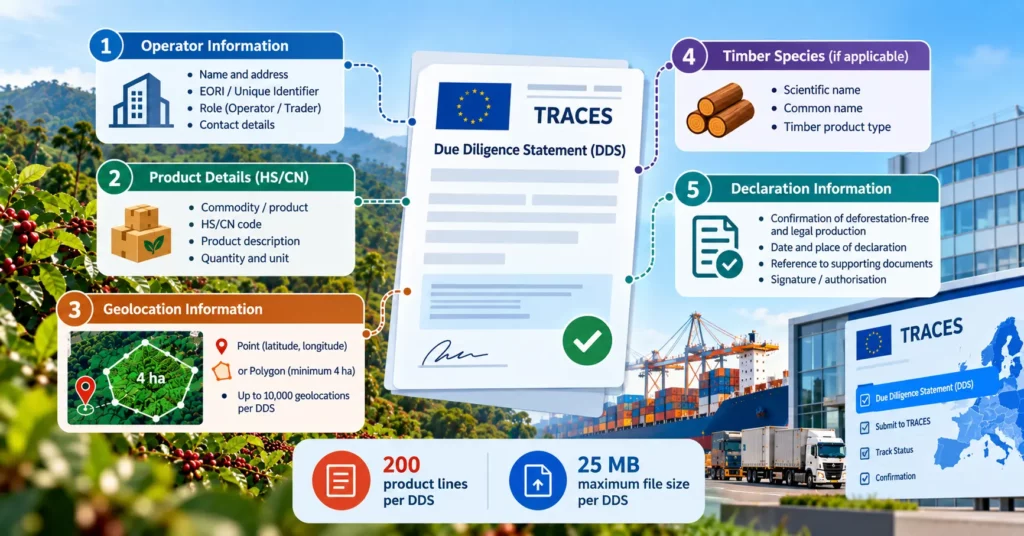
Annex II sets the content of an EU TRACES DDS submission, and the Information System enforces format and size rules on top of it.
Operator details, including EORI number
HS/CN code, description and quantity for each product line
Country of production and geolocation of every plot, plus establishments for cattle
Full scientific name of the wood species for timber products
Signed declaration that due diligence found no or negligible risk
Technical limits to plan for
Geolocation entered on the map or uploaded as GeoJSON in WGS 84 (EPSG:4326)
Single point allowed for plots up to 4 hectares; polygon required above 4 hectares
Maximum 200 product lines and 25 MB per statement
One DDS may cover several batches; the Commission recommends no more than 12 months of coverage
EU TRACES DDS Submission Steps: From Supplier Data to Reference Number
A clean EU TRACES DDS submission follows seven steps, and only the last three happen inside the system.
Register your organisation and users in the EUDR Information System, with the right roles for preparers and signatories.
Complete due diligence: collect supplier data, assess risk and mitigate until it is negligible.
Prepare geolocation: convert plots to valid GeoJSON, applying the 4-hectare point or polygon rule.
Build the statement in the web portal or send it through the Information System web services (API).
Sign and submit: the signatory confirms the declaration and files before placing or exporting.
Record the identifiers: log the reference and verification numbers against the batches they cover.
Use them downstream: enter C716 plus the reference number on the customs declaration, share the reference with buyers and retain records for five years.
Build in lead time. Because the reference number only exists after filing, the whole due diligence cycle must close before the shipment reaches customs.
EU TRACES DDS Submission Errors That Stop Clearance
Most failed filings trace back to a handful of avoidable data and timing errors.
The filing screen should never be where problems are discovered. When plot capture, geometry validation, risk scoring and product master data sit in one workflow, the statement is effectively finished before anyone opens TRACES. TraceX EUDR Solutions is designed to pre-validate each statement against Information System rules and file through the API, returning the reference number to your ERP and broker
See an EU TRACES DDS submission run end to end in TraceX.
The portal works for occasional filings; volume, many plots or frequent shipments call for API filing.
Capability
Manual TRACES portal
TraceX
Geolocation
Drawn or uploaded per statement
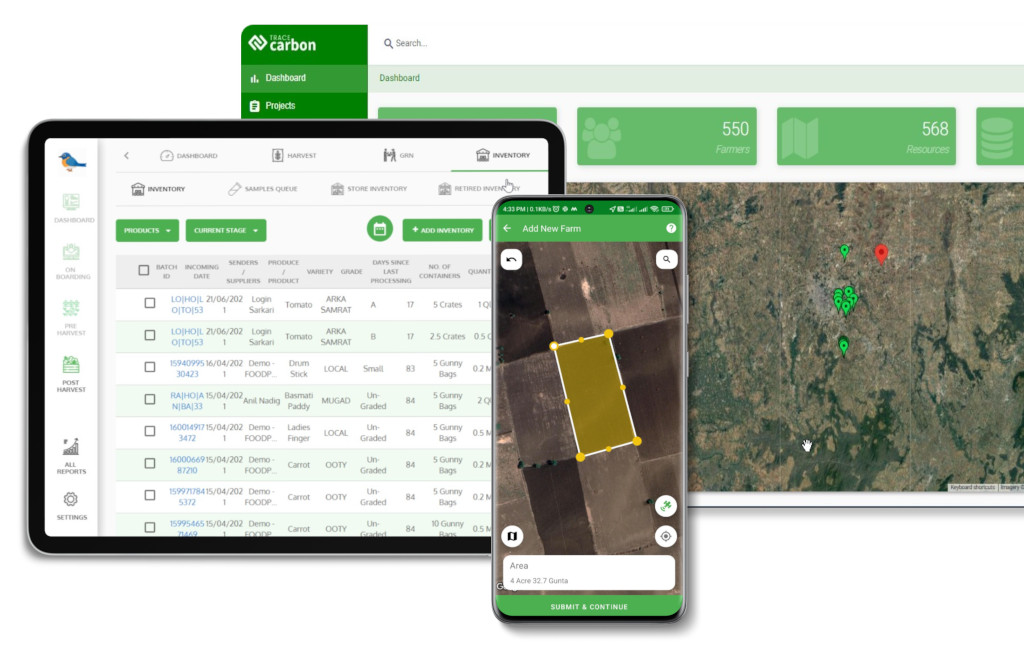
Captured in field app, validated before filing
Product lines
Typed per statement
Pulled from ERP product master
Pre-submission checks
Errors found at upload
Schema, geometry and code checks before filing
Filing
User logs in and submits
API submission from the platform
Identifiers
Copied by hand to customs and buyers
Returned and pushed to ERP, broker and buyers
Records
Scattered across drives
Five-year archive linked to each batch
Automating the EU TRACES DDS submission removes re-keying, the step where most identifier and code errors enter
EU TRACES DDS Submission Software: Buyer Evaluation Checklist
Ask vendors to demonstrate these capabilities on your own data, not a demo file.
Does it file through the Information System API and return reference and verification numbers automatically?
Does it enforce the 4-hectare point or polygon rule and validate GeoJSON in WGS 84?
Can it split or aggregate statements to stay within 200 lines and 25 MB?
Does it map HS/CN codes and timber species from your product master?
Can it pass C716 and reference numbers to your customs broker and buyers?
Does it support simplified declarations for micro and small suppliers?
Is it tested against the Commission acceptance environment after the 2026 specification changes?
Frequently Asked Questions
What is an EU TRACES DDS submission?
An EU TRACES DDS submission is the electronic filing of an EUDR due diligence statement in the EU Information System on TRACES NT, made before goods are placed on the EU market or exported.
Who has to submit a DDS in TRACES?
Operators that first place relevant products on the EU market or export them. Downstream operators and traders no longer file their own statements, and micro and small primary operators can file a simplified declaration.
What is the difference between the reference number and the verification number?
The reference number identifies the statement for customs and buyers. The verification number works with it as an access key to view the statement.
Can one DDS cover several shipments?
Yes. A statement can cover several batches, up to 200 product lines and 25 MB, and the Commission recommends it cover no more than 12 months.
Do I need a polygon or a point for each plot?
A single point is allowed for plots up to 4 hectares. Plots above 4 hectares need a polygon, and cattle require the location of the establishments.
Where does the reference number go on the customs declaration?
Customs authorities expect document code C716 followed by the DDS reference number on the import or export declaration.
Can I submit a DDS to TRACES through an API?
Yes. The Information System offers web services for automated EU TRACES DDS submission, which suits high volumes and ERP-linked workflows.
Start using TraceX
Transparency, Trust, & Success for your Climate Journey.
We use cookies on our website to give you the most relevant experience by remembering your preferences and repeat visits. By clicking “Accept All”, you consent to the use of ALL the cookies. However, you may visit "Cookie Settings" to provide a controlled consent.
This website uses cookies to improve your experience while you navigate through the website. Out of these, the cookies that are categorized as necessary are stored on your browser as they are essential for the working of basic functionalities of the website. We also use third-party cookies that help us analyze and understand how you use this website. These cookies will be stored in your browser only with your consent. You also have the option to opt-out of these cookies. But opting out of some of these cookies may affect your browsing experience.
Necessary cookies are absolutely essential for the website to function properly. These cookies ensure basic functionalities and security features of the website, anonymously.
Cookie
Duration
Description
cookielawinfo-checkbox-analytics
11 months
This cookie is set by GDPR Cookie Consent plugin. The cookie is used to store the user consent for the cookies in the category "Analytics".
cookielawinfo-checkbox-functional
11 months
The cookie is set by GDPR cookie consent to record the user consent for the cookies in the category "Functional".
cookielawinfo-checkbox-necessary
11 months
This cookie is set by GDPR Cookie Consent plugin. The cookies is used to store the user consent for the cookies in the category "Necessary".
cookielawinfo-checkbox-others
11 months
This cookie is set by GDPR Cookie Consent plugin. The cookie is used to store the user consent for the cookies in the category "Other.
cookielawinfo-checkbox-performance
11 months
This cookie is set by GDPR Cookie Consent plugin. The cookie is used to store the user consent for the cookies in the category "Performance".
viewed_cookie_policy
11 months
The cookie is set by the GDPR Cookie Consent plugin and is used to store whether or not user has consented to the use of cookies. It does not store any personal data.
Functional cookies help to perform certain functionalities like sharing the content of the website on social media platforms, collect feedbacks, and other third-party features.
Performance cookies are used to understand and analyze the key performance indexes of the website which helps in delivering a better user experience for the visitors.
Analytical cookies are used to understand how visitors interact with the website. These cookies help provide information on metrics the number of visitors, bounce rate, traffic source, etc.
Advertisement cookies are used to provide visitors with relevant ads and marketing campaigns. These cookies track visitors across websites and collect information to provide customized ads.
Download the 2026 Traceability Scorecard and Benchmark Your Supply Chain Across 10 Critical Capabilities.
Download our eBook
Don’t Wait for an Audit to Find Your EUDR Gaps
The 2026 Simplification Package changes how HS codes, DDS pass-through and geolocation rules apply to you. Get the free guide and 20-point readiness checklist before enforcement catches you unprepared.